Buyer's guide / Keyboards
Best gaming keyboards 2026, ranked
Five picks for gamers -- the Hall-effect flagship, a premium wireless board, a dependable mainstream mechanical, a budget magnetic-switch surprise, and the high-polling wireless option -- ranked from published specs and independent testing.
By Evan Cole · Last updated July 22, 2026
Gaming keyboards changed more in the last two years than in the decade before, and the reason is Hall-effect magnetic switches. Instead of a fixed press point, you set the actuation depth in software and turn on "rapid trigger" so a key re-fires the instant you lift it. The result is a board that can feel faster in twitchy games — and, thanks to brands like AULA, that technology now starts at budget money instead of flagship money.
This guide is a research-led synthesis of manufacturer specifications and independent testing -- principally RTINGS, linked per pick -- plus long-term owner consensus. Every figure below traces to a cited source; it was produced with AI assistance as part of our research workflow, and where a board has no independent lab review we say so. Product photos are courtesy of each manufacturer.
The verdict, at a glance
Best overall
RTINGS' top gaming pick — the lowest measured latency of the group and the reference adjustable-actuation + rapid-trigger board.
Best wireless
A premium 75% Hall-effect board that's genuinely wireless, with an aluminium frame and knob that feel a tier above the price.
Best mainstream on a budget
A dependable mainstream mechanical — sturdy, low-flex full-size with great latency for mainstream money.
Best budget Hall-effect
The budget-Hall-effect story in one board — 8000 Hz polling, adjustable actuation and rapid trigger at budget money.
Best 8 kHz wireless
A rare 8000 Hz-and-wireless magnetic board — very low latency plus multi-device 2.4GHz/Bluetooth, no cable required.
Among the Hall-effect picks, the Wooting 80HE, AULA WIN60 HE and NuPhy WH80 reach 8000 Hz polling; the Lemokey P1 HE tops out at 1000 Hz. We don't print prices — they move week to week, so any figure here would be stale before you read it. Follow a link for the live listing.
At a glance: specs compared
Every pick side by side. Because keyboard latency in milliseconds is measured only by RTINGS and sits behind their paywall, we don't print a latency figure we can't cite — instead each board carries a “lab-tested vs manufacturer-stated” badge (a distinction no other guide makes), with the labs' own latency wording below.
| Keyboard | Switch | Actuation | Polling | Rapid trigger | Connectivity | Hot-swap | Independently tested? |
|---|---|---|---|---|---|---|---|
| Best overall Wooting 80HE | Hall-effect (magnetic) Lekker | 0.1-4.0mm (adjustable) | 8,000 Hz | Yes | Wired USB-C only | Yes (magnetic) | ✓ Lab-tested (RTINGS) |
| Best wireless Lemokey P1 HE | Hall-effect (magnetic) Gateron Double-Rail | 0.2-3.8mm (adjustable) | 1,000 Hz the only 1000Hz (not 8k) board here | Yes | Wired + 2.4GHz + Bluetooth 5.2 | Limited (Gateron magnetic stems) | ✓ Lab-tested (RTINGS) |
| Best mainstream on a budget Corsair K70 CORE | Mechanical (linear) Corsair MLX Red | fixed (no adjust) | 1,000 Hz | No | Wired | No (soldered) | ✓ Lab-tested (RTINGS) |
| Best budget Hall-effect AULA WIN60 HE | Hall-effect (magnetic) Greywood / Wing Chun (Max) | 0.08-3.4mm (adjustable) | 8,000 Hz | Yes | Wired only | Yes (magnetic) | Mfr-stated only |
| Best 8 kHz wireless NuPhy WH80 | Hall-effect (magnetic) Jade Dragon-N | 0.1-4.0mm (adjustable) | 8,000 Hz 8000Hz on wired + 2.4GHz; Bluetooth caps at 125Hz | Yes | Wired + 2.4GHz + Bluetooth | Yes (magnetic) | ✓ Lab-tested (RTINGS) |
Why no latency column. The only lab that measures keyboard single-key latency (RTINGS) publishes the millisecond figures behind a paywall, and no free source reproduces them — so rather than reprint a manufacturer claim as a measurement, we compare the citable spec facts and summarise what the labs say about latency below. Switch brands and actuation ranges are manufacturer specs; polling rate and switch class are publicly confirmed by RTINGS for the four tested boards.
What independent testing says about latency
- Wooting 80HE: RTINGS' #1 gaming pick; describes latency as 'exceptionally low' (exact ms is behind RTINGS membership). RTINGS review ↗
- Lemokey P1 HE: RTINGS calls its latency 'remarkably low' and 'well suited for gaming ... at any competitive level' - their #2 mid-range pick, at 1000Hz (exact ms paywalled). RTINGS review ↗
- Corsair K70 CORE: RTINGS' 'Best Budget Gaming Keyboard' pick, with 'outstanding latency performance' for a mainstream mechanical (exact ms paywalled). RTINGS review ↗
- AULA WIN60 HE: No independent lab review exists - its 8000Hz / rapid-trigger figures are manufacturer-stated, not verified.
- NuPhy WH80: RTINGS: 'superb latency performance alongside an 8,000Hz polling rate' (exact ms paywalled). RTINGS review ↗
Which switch for your games?
The honest version of the magnetic-switch pitch: the benefit isn't a latency number you can feel — it's the features (adjustable actuation, rapid trigger, analog output). This matrix is our own synthesis, matching game genre to the switch and actuation setting that actually help.
| You mostly play… | Switch | Actuation | What actually matters |
|---|---|---|---|
| Competitive FPS / esports | Hall-effect + rapid trigger | 0.1-1.0mm (shallow) | Rapid trigger; 8000Hz is a bonus; SOCD only where the game allows it Shallow actuation + rapid re-trigger is where magnetic switches genuinely help fast counter-strafing. |
| MOBA / RTS | Hall-effect or good mechanical | 1.2-2.0mm (balanced) | Per-key remaps; comfortable travel over ultra-shallow Accuracy and comfort over raw speed - a balanced actuation avoids accidental inputs during macros. |
| Rhythm games | Hall-effect + rapid trigger | 0.2-0.8mm (very shallow) | Rapid trigger, consistent double-taps Fast repeated presses reward the shallowest reliable actuation and instant re-trigger. |
| Racing / flight sim | Hall-effect with analog output | analog (full travel) | Analog / joystick output, not just digital on/off Analog Hall-effect lets a key act like a throttle/steering axis - a real feature, not marketing. |
| Typing / mixed / single-player | Mechanical (tactile) or HE at default | 1.8-2.5mm (standard) | Feel, stabilisers, sound - actuation tricks matter little For non-twitch use the switch feel and build matter far more than latency or 8000Hz. |
Our synthesis from the actuation-band consensus (shallow 0.1-1.0mm = fast/competitive; 1.1-2.5mm = balanced; 2.6-4.0mm = anti-misfire). Rapid trigger and analog output are real features; 8000Hz polling is a minor edge most players won't feel.
The picks in detail
Best overall
Wooting 80HE
— VerdictBits editorial score
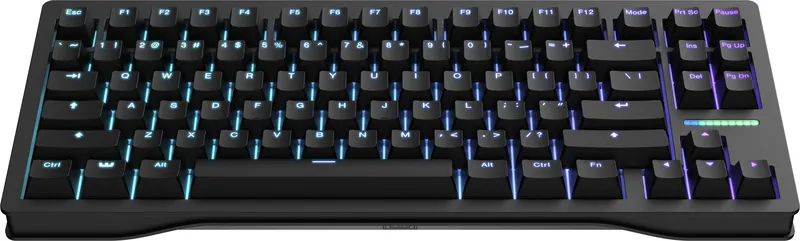
- Switch: Hall-effect magnetic (Lekker) — adjustable actuation 0.1–4.0mm, rapid trigger
- Layout: 80% / TKL
- Connectivity: Wired USB-C only
- Polling rate: 8000 Hz
- RGB: Status LED bar (subtle, not underglow)
Reasons to buy
- Lowest measured latency of the group (RTINGS)
- Adjustable actuation 0.1–4.0mm + rapid trigger
- 8000 Hz polling
- Best analog software (Wootility); outstanding build
Reasons to avoid
- Wired USB-C only
- Stiff gasket feel isn't for everyone
- No QMK/VIA — uses Wooting's own stack
- Flagship-priced
Why it's here: RTINGS' top gaming pick: outstanding build, the lowest measured latency of the group, and the best analog software (Wootility). Adjustable actuation plus rapid trigger is the reference implementation.
The catch: Wired-only, and the stiff gasket feel isn't for everyone. No QMK/VIA — it uses Wooting's own stack.
Sources: manufacturer specs · RTINGS review.
Best wireless
Lemokey P1 HE
— VerdictBits editorial score
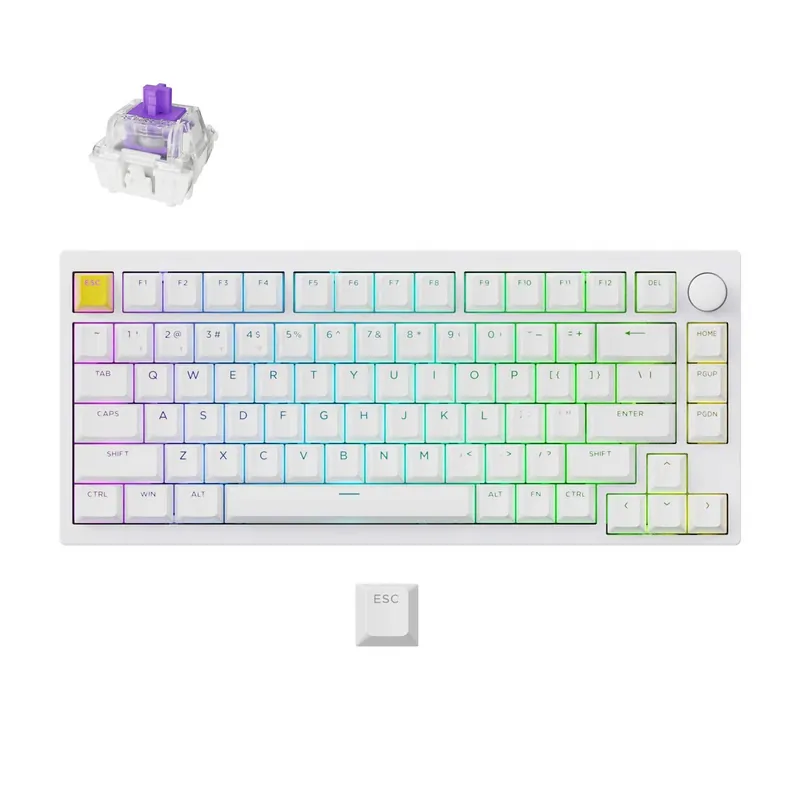
- Switch: Hall-effect magnetic (Gateron Double-Rail) — adjustable 0.2–3.8mm, rapid trigger
- Layout: 75% (81 keys, knob)
- Connectivity: Wired + 2.4GHz + Bluetooth 5.2
- Polling rate: 1000 Hz
- RGB: Shine-through per-key
Reasons to buy
- Genuinely wireless — 2.4GHz + Bluetooth 5.2 + wired
- Aluminium frame + knob feel above the price
- Adjustable actuation 0.2–3.8mm + rapid trigger
- RTINGS rates build and raw performance highly
Reasons to avoid
- Polling tops out at 1000 Hz (not 8k)
- Analog output can be inconsistent
- Hot-swap limited to Gateron Double-Rail magnetic stems
Why it's here: A premium 75% Hall-effect board that's genuinely wireless — RTINGS rates the build and raw performance highly, and the knob plus aluminium frame feel a tier above the price.
The catch: Polling tops out at 1000 Hz (not 8k), the analog output can be inconsistent, and hot-swap is limited to Gateron's Double-Rail magnetic stems.
Sources: manufacturer specs · RTINGS review.
Best mainstream on a budget
Corsair K70 CORE RGB
— VerdictBits editorial score
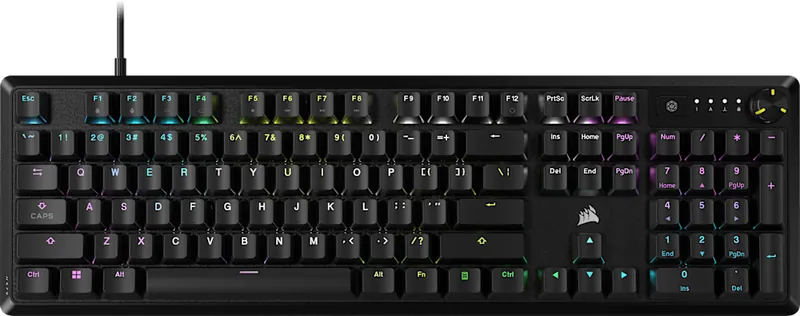
- Switch: Mechanical linear (Corsair MLX Red) — fixed actuation, no rapid trigger
- Layout: Full-size (TKL variant exists)
- Connectivity: Wired
- Polling rate: 1000 Hz
- RGB: Per-key RGB
Reasons to buy
- Sturdy, low-flex full-size build
- Great latency for the money (RTINGS pick)
- Per-key RGB
- Affordable for what it is
Reasons to avoid
- Switches soldered — no hot-swap
- No adjustable actuation or rapid trigger
- Polling stays at 1000 Hz
- Wired only
Why it's here: A sturdy, low-flex full-size board with great latency for the money — RTINGS' pick when you want a dependable mainstream mechanical rather than a magnetic-switch board.
The catch: Switches are soldered (no hot-swap), and it's a traditional mechanical: no adjustable actuation or rapid trigger, and polling stays at 1000 Hz.
Sources: manufacturer specs · RTINGS review.
Best budget Hall-effect
AULA WIN60 HE
— VerdictBits editorial score
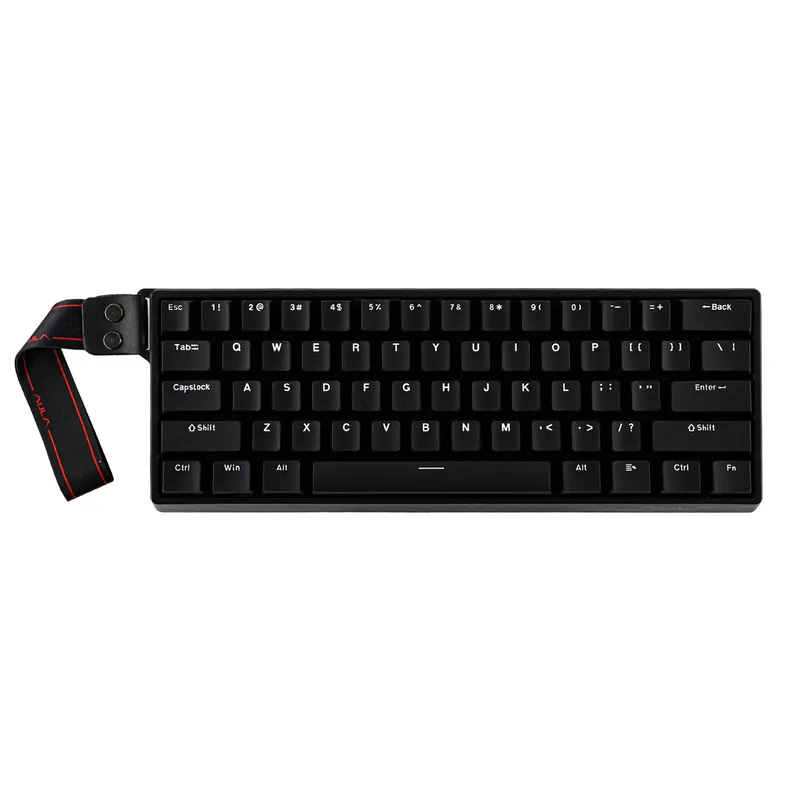
- Switch: Hall-effect magnetic (Greywood / Wing Chun on Max) — adjustable 0.08–3.4mm, rapid trigger (0.02mm step)
- Layout: 60% (61 keys, arrows included)
- Connectivity: Wired only
- Polling rate: 8000 Hz
- RGB: 16.8M-colour south-facing per-key (the visual draw)
Reasons to buy
- 8000 Hz polling at budget money
- Adjustable actuation 0.08–3.4mm + rapid trigger
- Bold south-facing per-key RGB
- 60% layout keeps arrow keys
Reasons to avoid
- Wired only
- Windows-only driver software
- No independent lab review — figures manufacturer-stated
Why it's here: The budget-Hall-effect story in one board: 8000 Hz polling, adjustable actuation and rapid trigger, and bold per-key RGB at a fraction of the flagships.
The catch: Wired-only, Windows-only driver software, and — importantly — no independent lab review, so its latency and accuracy figures are manufacturer-stated, not verified.
Sources: manufacturer specs · no independent lab review yet — figures are manufacturer-stated.
Best 8 kHz wireless
NuPhy WH80
— VerdictBits editorial score
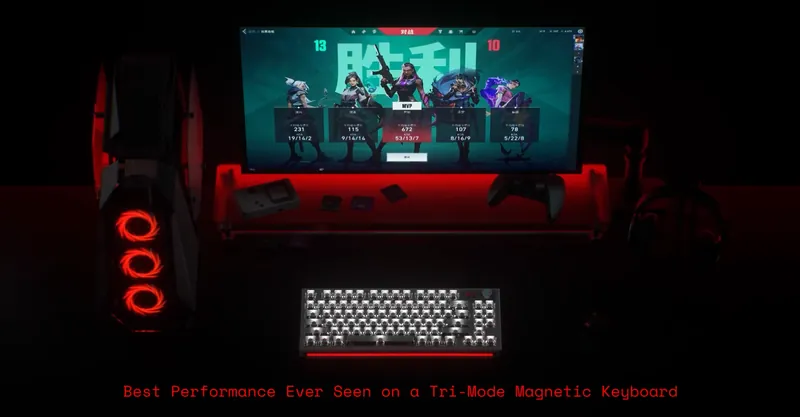
- Switch: Hall-effect magnetic (Jade Dragon-N) — adjustable actuation, rapid trigger
- Layout: TKL / 80%
- Connectivity: Wired + 2.4GHz + Bluetooth
- Polling rate: 8000 Hz
- RGB: Shine-through per-key
Reasons to buy
- Rare 8000 Hz + wireless combination
- Very low latency (RTINGS)
- Multi-device 2.4GHz + Bluetooth
- Adjustable actuation + rapid trigger (Jade Dragon-N)
Reasons to avoid
- Most expensive pick here
- High profile really wants a wrist rest
- Analog output can be quirky
Why it's here: A rare 8000 Hz-and-wireless combination: RTINGS notes very low latency plus multi-device 2.4GHz/Bluetooth. If you want the high-polling magnetic experience without a cable, this is it.
The catch: The most expensive pick here, the high profile really wants a wrist rest, and the analog output can be quirky.
Sources: manufacturer specs · RTINGS review.
If RGB and looks matter most: the AULA family
AULA has become one of the most popular budget keyboard brands almost entirely on the strength of striking per-key RGB at very low prices — and they keep trending. Beyond the WIN60 HE above, two more are worth a look if colour and value matter more to you than a lab-verified spec sheet. The honest caveat is the same throughout: AULA boards run AULA's own Windows-only software rather than QMK/VIA, and their Hall-effect models have not been independently lab-tested.
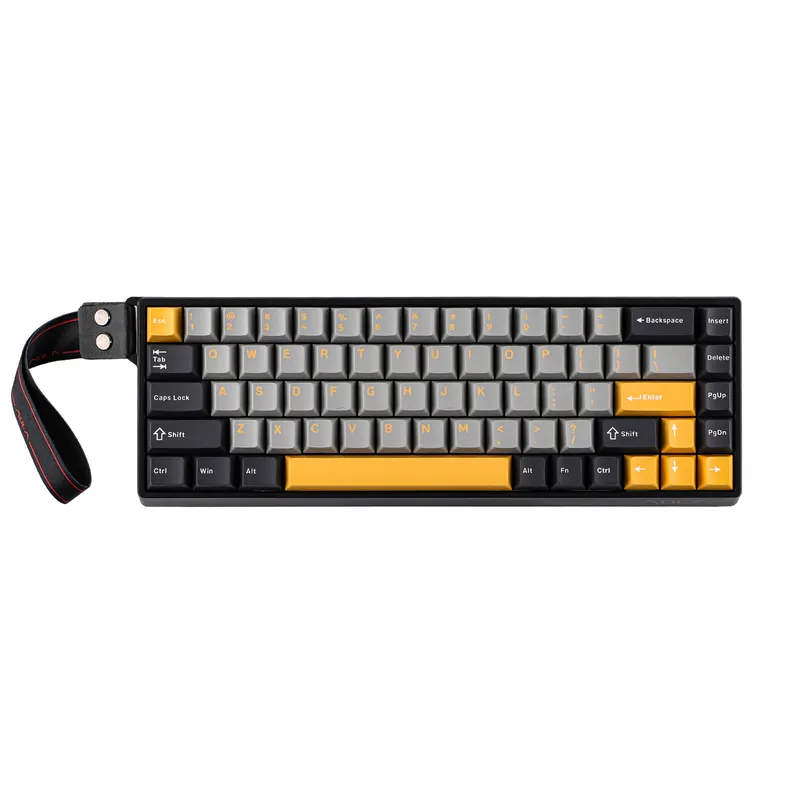
- AULA WIN68 HE — the WIN60's slightly larger sibling: a 65% / 68-key gasket board with the same Hall-effect magnetic switches, adjustable actuation and 8000 Hz polling, plus arrow and navigation keys. Bold south-facing RGB. Budget tier. Check on Amazon →
- AULA F75 — the RGB board you've seen everywhere: a 75% hot-swap mechanical (not Hall-effect), tri-mode wireless, with 26 lighting effects and music sync. A looks-and-value pick rather than an esports tool. Budget tier. Check on Amazon →
- AULA F87 — the same RGB recipe in a TKL layout, some versions adding a small dot-matrix screen and audio visualiser. A striking showpiece; specs vary by revision. Check on Amazon →
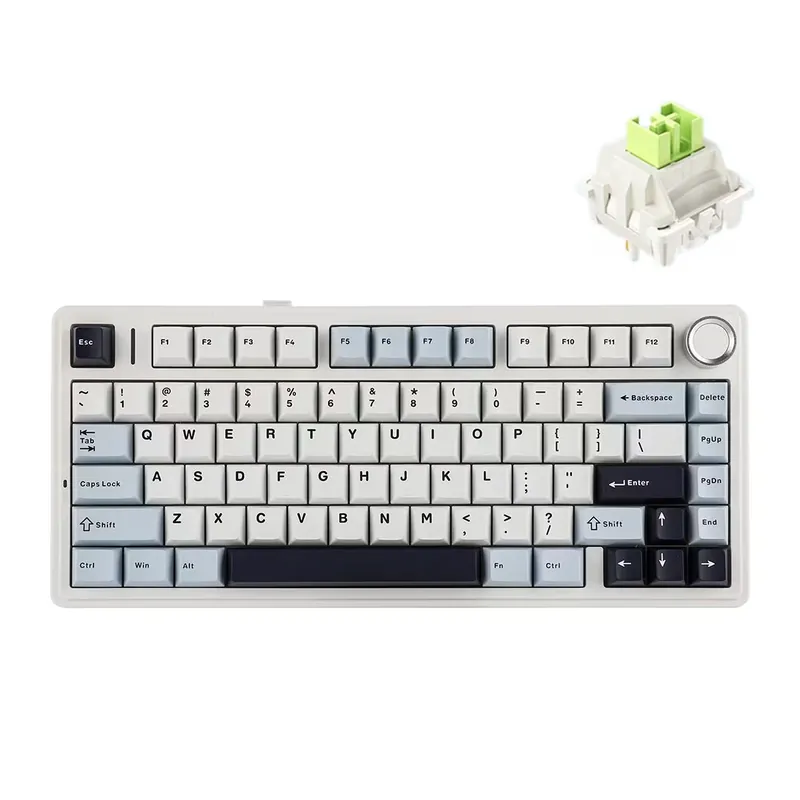
Specs from AULA's product pages. No independent lab review yet.
Also worth considering
MonsGeek FUN60 Ultra — if you want a 60% Hall-effect board a step up from the AULA, the FUN60 Ultra pairs 8000 Hz polling and an aluminium case with RTINGS-noted strong performance at budget money. We haven't featured it with a photo above because no clean manufacturer image was available, but it's a legitimate budget-HE alternative. Check on Amazon →
TMKB T68C (HE) — another budget Hall-effect board to cross-shop against the AULA WIN60: a compact 68-key (60%-style) magnetic layout with adjustable actuation (0.02–4.0mm), rapid trigger, 8000 Hz polling and per-key RGB configured in the browser (no app install), wired over USB-C. It carries a 4.5-star average across early Amazon reviews. The same honest caveat as the AULA applies — no independent lab review yet, so its latency and actuation figures are manufacturer-stated, not verified. Check on Amazon →
Worth pairing (honest complementary picks)
These are category recommendations, not specific SKUs — genuinely useful alongside any of the boards above:
- A large XL / desk-mat mousepad — a low-friction surface for the fast mouse movements a Hall-effect board encourages, and it unifies the desk. Browse on Amazon →
- A wrist rest — most useful with the taller boards here (the Wooting 80HE and high-profile NuPhy WH80). Browse on Amazon →
- A shine-through PBT keycap set — a natural RGB upgrade for the hot-swap boards whose stock caps don't light through cleanly. Browse on Amazon →
- A coiled USB-C cable — for the wired boards, a tidier, aviator-style cable is the classic finishing touch. Browse on Amazon →
Compare retailers: our picks link to Amazon — it's also worth cross-checking current gaming keyboard prices on Newegg →.
Frequently asked questions
What is the best gaming keyboard in 2026?
Based on RTINGS' testing, the Wooting 80HE is the strongest all-round gaming pick: a Hall-effect magnetic board with adjustable actuation, rapid trigger, and 8000 Hz polling, with the lowest measured latency of the group. If you want that magnetic-switch experience on a budget, the AULA WIN60 HE offers 8000 Hz polling and adjustable actuation at budget money — with the honest caveat that it has no independent lab review yet. This is a synthesis of published specs and independent reviews.
What are Hall-effect (magnetic) switches, and do they matter for gaming?
Hall-effect switches sense the key's position magnetically instead of with a physical metal contact. That lets you set the actuation point in software (say, a very shallow 0.1–0.5mm for fast games) and use 'rapid trigger,' where the key re-actuates the instant you lift and press again. For fast-paced competitive games this can feel more responsive than a traditional mechanical switch. For slower or single-player games the difference is smaller. The Wooting 80HE, Lemokey P1 HE, AULA WIN60 HE and NuPhy WH80 here are all Hall-effect; the Corsair K70 CORE is a conventional mechanical.
Is 8000 Hz polling actually worth it?
Polling rate is how often the keyboard reports to the PC — 1000 Hz once per millisecond, 8000 Hz eight times per millisecond. In theory 8000 Hz shaves a fraction of a millisecond off input latency; in practice most players won't feel the jump from 1000 Hz, and it needs a capable PC to sustain. It's a genuine edge for competitive/esports play and a nice-to-have otherwise — not a reason on its own to pick a keyboard. Note that a great 1000 Hz board (like the Lemokey P1 HE) can still out-feel a mediocre 8000 Hz one.
Are AULA gaming keyboards any good?
AULA has become hugely popular on the strength of striking RGB and Hall-effect features at very low prices, and owner sentiment is broadly positive. The honest caveats: their boards run AULA's own Windows-only driver software rather than open QMK/VIA, and — unlike the Wooting, Lemokey and NuPhy picks — AULA's Hall-effect boards have not been independently lab-tested, so quoted latency and accuracy figures are manufacturer-stated. Treat them as a strong value-and-looks choice rather than a lab-proven esports tool.
Wired or wireless for gaming keyboards?
Wired over USB-C still gives the lowest, most consistent latency, which is why the Wooting 80HE and Corsair K70 CORE are wired. That said, modern 2.4GHz wireless on boards like the Lemokey P1 HE and NuPhy WH80 is close enough that most players won't notice, and you gain a cleaner desk and multi-device switching. Bluetooth adds more latency and is better for typing than twitch gaming. If you play competitively, wired or 2.4GHz; if you value tidiness, 2.4GHz wireless is a safe pick.
Related guides
- Best keyboards for programming of 2026 — the same board classes, ranked for coding instead of gaming.
- Best graphics cards of 2026 — the other half of a gaming rig.
- Best mouse of 2026 — the other half of your battlestation, gaming to ergonomic.
- Keyboard switches compared 2026 — sortable data on linear, tactile, clicky and Hall-effect switches.
- GPU benchmark hierarchy 2026 — sortable performance-per-dollar.
- Best standing desks of 2026 — what the setup sits on.
Affiliate disclosure: some links above are affiliate links (Amazon
Associates, tag setupquarterly-20) — if you buy through
them, VerdictBits may earn a commission at no extra cost to you. We do not
accept payment for reviews, and commissions never influence a pick. See our
disclosure and methodology.
See it in a matched setup
All setups →White
The white setupA clean, all-white build — keyboard, mouse, headset and deskmat chosen to match by their real colour, not just the label. Budget-to-mid, cross-brand, with the honest caveats up front.
Pink
The pink setupA soft pastel-pink build across keyboard, mouse, headset and deskmat — with the shade differences called out honestly and a fully-synced Razer Quartz option for people who want an exact match.
Purple
The purple setupA purple-family build across keyboard, mouse and headset — honest up front that these are three different purple shades, because no single brand makes a complete, exactly-matched purple set in 2026.
Related buyer's guides
All reviews →Reference / Keyboards
Keyboard switches compared (2026)
A sortable reference table of 18 popular keyboard switches -- Cherry, Gateron, Kailh, Wooting -- by actuation force, travel, sound and type, from independent sources.
Compare switches →
Buyer's guide / Keyboards
The best keyboards for programming in 2026
Five picks for developers: a premium aluminium custom, a value board with the same firmware, a portable low-profile, a budget surprise, and the quietest option for shared offices.
5 picks →
Buyer's guide / AIO coolers
The best AIO liquid CPU coolers in 2026
Five 360 mm AIOs for five different builders: the consensus value+performance winner, the LCD display for creators, the iCUE-Link cable cleanup, the RGB showpiece, and the budget cooler that beats coolers twice its price.
5 picks →
Buyer's guide / Standing desks
The best standing desks for developers and creators in 2026
Five picks for five workstations: the most-customizable premium desk, the price-to-performance value pick, the eco-conscious bamboo classic, the four-leg desk for triple-monitor builds, and the one that goes from box to built in fifteen minutes.
5 picks →
Buyer's guide / GPUs
RTX 5090 vs RTX 5080: which should you buy?
The 5090 doubles the 5080's VRAM, compute and price. For gaming that's rarely worth it; for VRAM- or CUDA-bound creator and AI work it often is. A sourced head-to-head plus a clear buying call.
Read the comparison →
Buyer's guide / GPUs
RTX 5070 Ti vs RX 9070 XT: which should you buy in 2026?
Roughly tied at 1440p, the 5070 Ti edges 4K and wins ray tracing, creation and local AI; the 9070 XT wins raster-per-dollar — a gap the 2026 memory shortage widened. Sourced head-to-head plus a verdict by use case.
Read the comparison →